Posts

How to Calibrate Your Monitor
Image
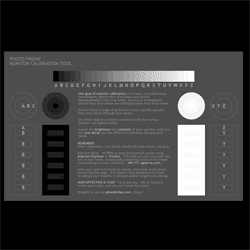
To calibrate one's monitor means to reset it to an accurate display of light and color. To make sure your seeing your own images accurately, you may want to calibrate your monitor every couple months. ( This link  provides a 'test page' of black and whites that may help you decide whether to perform a calibration. Handy instructions are provided:  http://www.photofriday.com/calibrate.php Calibrating your monitor can be a simple and free process. If you have Adobe Photoshop installed, you will already a calibration tool, Adobe Gamma, installed as well. To access it on a PC  (scroll down for instructions for Mac):  Go to your  Start  button (lower left corner of your screen),  /Control Panel/Adobe Gamma .  Move the pop up box to a lower or upper corner (this will make sure it not covered up by the monitor settings overlay in the next step). Then just follow the on screen directions. The pop up box will walk you through adjusting you...

Editing Photos for Print: When to Convert to CMYK?

Image
Editing Photos for Print: When to Convert to CMYK? Thank you for the great comments and suggestions on my posts about printing your own  Artist Business Cards  on my painting blog . I hope that some of you will be inspired to have cards printed (and I would love to see your results!). Loredana  asked a really great question this week:  "When you work on your photos to correct levels or balancing or anything else, do you work on RGB and after you modify it, you switch to CMYK to print?; or you switch to CMYK directly and you modify it later? I noticed a big difference from one to another when I watch the folder's preview and find the CMYK quite uncomfortable to watch!" The simple answer (with a few extra details):  For Print: Start with RGB, and do all or most of your editing in RGB. RGB is the native format for most digital files. Some editing procedures are not available in CMYK. Convert to CMYK as the last step  only if the file is being sent...

Program or be Programmed - Book Review

Image
Program or be Programmed - Book Review This is a quick review of Douglas Rushkoff's book  "Program or be Programmed". Its a pocket guide to how to become a literate participant in the digital age. It's small, quick to read and well worth the effort. Douglas Rushoff's basic premise is that in "the emerging, highly programmed landscape ahead, you will either create the software or you will be the software.  It's really that simple: Program or be programmed." - a direct quote from his book. I couldn't agree more - is the population going to be controlled by mobile technology,  facebook and it's future derivatives (including  interfaces that blend man and machine  even more) or will you recognise this control, and decide to program your own alternative? As Douglas mentions, we have the capacity to do something about this, but this time round we could  relinquish control not just to other people (as in religion and economi...

Make arrows and triangles with CSS only - no images

Image
Make arrows and triangles with CSS only - no images So today I wanted to make an arrow like the one below but I wanted to do this with CSS and not using a background image. As you'll know you can now make rounded corners using CSS3, but what about triangles and arrows like the one above? The answer is to use a trick with element borders.  Essentially when you make a big border on a tiny box they intersect in a triangle like this image. Then all you do is make three sides transparent so you see a triangle. This triangle is then added using the  :after pseudo-element to stick it onto a div box with the text inside. Here is the CSS code for a div tag with an id="arrow" just like my blue one above. #arrow {background-color: #3366cc; height: 30px; position: relative; width: 130px;color:#FFF;} #arrow:after {content: ' '; height: 0; position: absolute; width: 0; border: 15px solid transparent; border-left-color: #3366cc;left: 100%;top: 0px;}

CMYK vs. RGB: knowing which color space to use

Image
CMYK vs. RGB: knowing which color space to use The two basic color spaces, or Modes , that you'll most often encounter with your digital images are  RGB  and  CMYK . Each has a specific use, outlined below. RGB  (Red-Green-Blue) is the color of the  light  emitted from your computer monitor , and from TV's. Use  RGB  if you are taking photos specifically  to be viewed  onscreen , such as the internet, or for a CD or emails.  RGB  usually also works well for printing from your home or office printer. CMYK  (Cyan, Magenta, Yellow, Black) is the color of  inks  used in the offset printing process.  Use  CMYK  if you are sending your photo  to be printed , such as preparing a postcard to be professionally printed for a gallery invite. NOTE: CMYK is an option offered only in full versions of Photoshop; it is not available in Photoshop elements or most other photo editing programs (if you kn...

Responsive web design boilerplates - free!

Image
Responsive web design boilerplates - free! Following on from previous posts about responsive web design ( what is responsive web design ) and ( examples of responsive web design ) - here are a couple of great links to free boilerplates to get you started with HTML5 and CSS3 with all the media queries done for you :) 1) Gridless  - the basic no-grid boilerplate that is responsive.  Check it out at  http://thatcoolguy.github.com/gridless-boilerplate/ 2)Skeleton  - the boilerplate with the awesomely adaptable 12 column grid.  Just what we all want :) Check it out at  http://getskeleton.com/

Social media marketing

Social media marketing Interesting article over at businessinsider.com about social media marketing. The interview with Marc Schiller has some insights into the psyche of consumers of social media, which I've summarised in point form.  Check out the full interview here -  businessinsider.com In social media marketing behaviours come first, technology second.  There is still a fundamental need to be heard - the tools have changed but the behaviours haven't. People now have the ability to "curate" the info around them. This means that if they don't hear about something through the social feeds, they assume it isn't important to them. "90 percent of the population doesn't have that confirmation that they're being heard. I think that what drives people to express themselves online is a confirmation of their own self-worth… The reason why people write on walls is to say, hey listen, I'm here. I'm a person." People who follow cr...

To check performance of query through sqlplus command prompt

   Here's explain plan: SQL > explain plan for   2  select * from emp;  E xplained. SQL > select * from table(dbms_xplan.display()); PLAN_TABLE_OUTPUT ----------------------------------------------------------------------------------------------- Plan hash value : 1833546154 --------------------------------------------------------------------------------------------- | Id  | Operation                   | Name          | Rows  | Bytes | Cost (%CPU)| Time     | --------------------------------------------------------------------------------------------- |   0 | SELECT STATEMENT            |   ...

Convert Flash swf to HTML5 - free!

Image
I've written posts in the last 18months about the slow demise of Flash (click the  Flash  label on side panel) and the rise in HTML5.  So wouldn't it be great to convert SWF to HTML5. Now you can, free!!!!! Google labs have the  swiffy  tool  www.google.com/doubleclick/studio/swiffy/  - upload your swf file and it converts to HTML5. There are a few technical restrictions - file size to 1MB and restricted to ActionScript2.0 (read the FAQ for more details) It does a lovely job of converting vector graphics to SVG and using HTML animation. This is a major bonus - html5 banners and headers, slideshows.. anything that is a vector and isn't too complex in AS2 code.

How to embed a PDF document into HTML web page

Image
PDF the Portable Document Format, although created by Adobe in the early 90's is now an open standard ISO format for documents. It's a great way of converting propriety documents (excel, word etc.) into a easily viewable/exchangable format. Putting PDFs into web pages is increasing popular - you can view documents as they should appear with images and text formatted as the author intended. So.. how do you embed a pdf into a web page? The simple way is to use the  <object>  element. This assumes that the web browser has a PDF plugin - if not you can add a message to allow a direct download of the PDF instead. <object data="filename.pdf" type="application/pdf" width="100%" height="100%">   <p>Your web browser doesn't have a PDF plugin.   Instead you can <a href="filename.pdf">click here to   download the PDF file.</a></p> </object>

PL/SQL Functions

What is a Function in PL/SQL? A function is a named PL/SQL Block which is similar to a procedure. The major difference between a procedure and a function is, a function must always return a value, but a procedure may or may not return a value. The General Syntax to create a function is:  CREATE [OR REPLACE] FUNCTION function_name [parameters] RETURN return_datatype;  IS  Declaration_section  BEGIN  Execution_section Return return_variable;  EXCEPTION  exception section  Return return_variable;  END; 1)  Return Type:   The header section defines the return type of the function. The return datatype can be any of the oracle datatype like varchar, number etc. 2) The execution and exception section both should return a value which is of the datatype defined in the header section. For example, let’s create a frunction called ''employer_details_func' similar to the one created...

Exception Handling

In this section we will discuss about the following,  1) What is Exception Handling. 2) Structure of Exception Handling. 3) Types of Exception Handling.  1) What is Exception Handling? PL/SQL provides a feature to handle the Exceptions which occur in a PL/SQL Block known as exception Handling. Using Exception Handling we can test the code and avoid it from exiting abruptly. When an exception occurs a messages which explains its cause is recieved. PL/SQL Exception message consists of three parts.  1) Type of Exception 2) An Error Code 3) A message    By Handling the exceptions we can ensure a PL/SQL block does not exit abruptly.   2) Structure of Exception Handling. The General Syntax for coding the exception section    DECLARE    Declaration section  BEGIN    Exception section  EXCEPTION  WHEN ex_name1 THEN     -Error handling statem...